
Continue.dev Cursor के बाद: Final Open-Source Release को Local Ollama के साथ चलाएँ
English version: Read this article in English
Continue VS Code और JetBrains के लिए open-source coding agent बनाता था: chat, inline edit, autocomplete और अपने models से जुड़ने वाला agent mode। 2026 में Continue ने बताया कि वह Cursor से जुड़ गया, और public GitHub repository अब read-only है तथा extension, CLI और JetBrains plugin का polished final 2.0.0 release उपलब्ध है। यह गाइड उन developers के लिए है जो अभी भी वह open-source stack चाहते हैं — खासकर local Ollama models के साथ, ताकि code आपकी मशीन पर रहे।
अभी क्या काम करता है
Continue की docs अभी भी Agent, Chat, Edit और Autocomplete modes तथा Continue CLI बताती हैं। GitHub README के अनुसार final 2.0.0 में anonymous telemetry हटाई गई, authentication निकाली गई और bugs ठीक किए गए। इसे लंबे public roadmap वाले product की बजाय अंतिम polished drop समझें। Install करते समय Marketplace / OpenVSX / GitHub release pages पर exact build देखें।
Ollama के साथ क्यों जोड़े
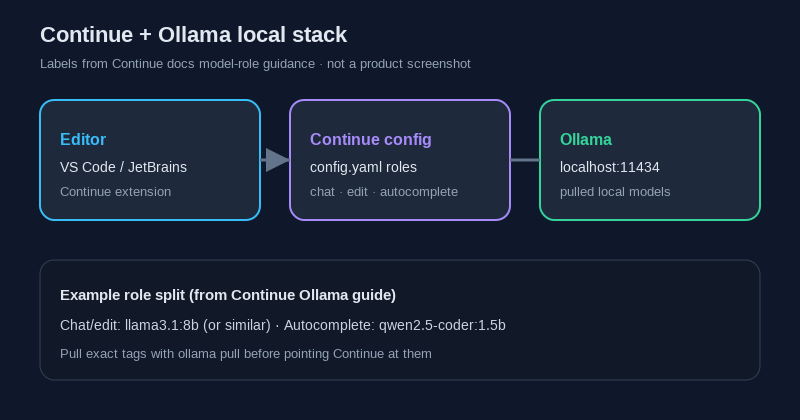
Continue की Ollama guide privacy या offline काम के लिए व्यावहारिक रास्ता है। आधिकारिक prerequisites: macOS, Linux या Windows, कम से कम 8GB RAM (16GB+ बेहतर), लगभग 10GB खाली disk, और Continue extension। Ollama models को http://localhost:11434 पर serve करता है। Continue config.yaml model blocks, Autodetect, या manual provider: ollama से जुड़ सकता है।
Local सेटअप के कदम
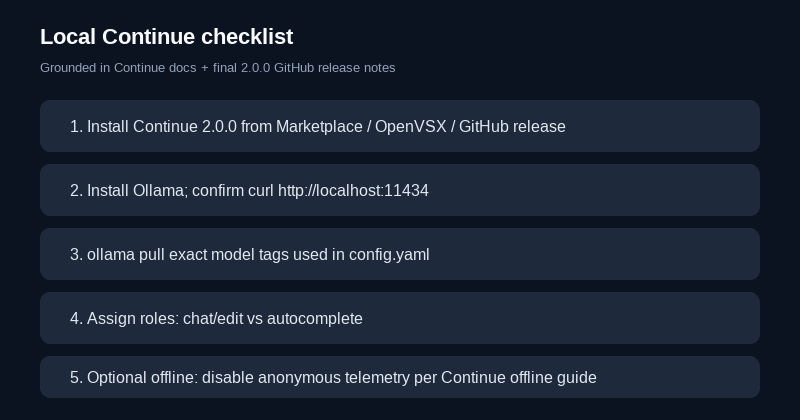
- Continue 2.0.0 इंस्टॉल करें — VS Code Marketplace, OpenVSX, या README में सूचीबद्ध GitHub release से। JetBrains users के लिए README अब JetBrains plugin की बजाय Continue CLI सुझाता है।
- Ollama इंस्टॉल और चालू करें (Homebrew, Linux install script, या Windows installer)।
curl http://localhost:11434से जाँचें। - Exact model tags
ollama pullसे लें — docs कहते हैं Continue के लिएollama runकी ज़रूरत नहीं। उदाहरण: autocomplete के लिएqwen2.5-coder:1.5b, chat के लिएllama3.1:8b।ollama listऔर config का tag मिलाना404 model not foundसे बचाता है। - Roles सेट करें — docs का आम पैटर्न: एक model पर
chat,edit,apply; छोटे coder model परautocomplete।uses: ollama/...blocks सिर्फ config देते हैं; tag locally pull करना ज़रूरी है। - Editor restart करें। Air-gapped उपयोग के लिए offline guide:
.vsixसे install, anonymous telemetry बंद, local default model, फिर restart।
Local coding को उपयोगी रखने की आदतें
- Model का सही आकार चुनें। Guide के अनुसार लगभग 1.5B–3B ≈ 4GB RAM, 7B ≈ 8GB, 13B ≈ 16GB, 32B ≈ 32GB। Memory error पर
contextLengthघटाएँ या छोटा tag लें। - Autocomplete और chat अलग रखें। Tab complete के लिए तेज़ छोटे coder; chat/edit के लिए बड़ा model।
- Agent-mode सीमाएँ जानें। कुछ Ollama models को
capabilities: [tool_use]चाहिए। फिर भी unsupported हो तो docs उदाहरणों वाले confirmed tool-support models पर जाएँ। - Git साफ़ रखें। बड़े edits से पहले commit करें।
यह किसके लिए है
अगर Continue का UX पसंद है, offline/private inference चाहिए, या Cursor acquisition के बाद Apache-2.0 codebase reference चाहिए तो यह रास्ता ठीक है। सक्रिय cloud IDE agent चाहिए तो Cursor या हमारी coding agents सूची देखें, और Continue की acquisition page पढ़कर expectations मिलाएँ।
Sources
- Continue acquisition page (continue.dev)
- continuedev/continue README — final 2.0.0 / read-only note
- Continue docs: What is Continue?
- Continue docs: Using Ollama with Continue
- Continue docs: Running Continue without internet
- Continue docs: Autocomplete with Ollama
- VS Marketplace: Continue
FAQ
Cursor से जुड़ने के बाद Continue क्या अभी open source है?
हाँ। Continue.dev कहता है वह Cursor से जुड़ा और open-source codebase उपलब्ध है। GitHub README repository को read-only बताता है और final 2.0.0 release की ओर इशारा करता है।
क्या इस गाइड के लिए cloud API key ज़रूरी है?
नहीं। Continue docs का Ollama path models को locally चलाता है। बाद में cloud providers जोड़ सकते हैं।
Continue “model not found” क्यों कहता है?
अक्सर config में ऐसा tag है जो pull नहीं हुआ, या :latest लिया जबकि block :32b जैसा specific tag चाहता है। ollama list से strings मिलाएँ।
क्या Continue पूरी तरह offline चल सकता है?
Continue offline path document करता है: GitHub Releases से .vsix, anonymous telemetry बंद, local default model, editor restart। विवरण के लिए वर्तमान offline guide देखें।