Continue.dev After Cursor: Run the Final Open-Source Release With Local Ollama
Also available in Hindi: यह लेख हिंदी में पढ़ें
Continue is an open-source coding agent for VS Code and JetBrains (chat, edit, autocomplete, agent mode). In 2026 it joined Cursor; the GitHub repo is now read-only with a polished final 2.0.0 release. This guide keeps that stack useful — especially with local Ollama so code stays on your machine.
What still works
Continue's docs still describe Agent, Chat, Edit and Autocomplete modes, plus a Continue CLI. The GitHub README says the final 2.0.0 release removed anonymous telemetry, pulled out authentication, and fixed bugs. Treat it as a maintained-for-now final drop, not a product with a long public roadmap. Always prefer the Marketplace / OpenVSX / GitHub release pages for the exact build you install.
Why pair it with Ollama
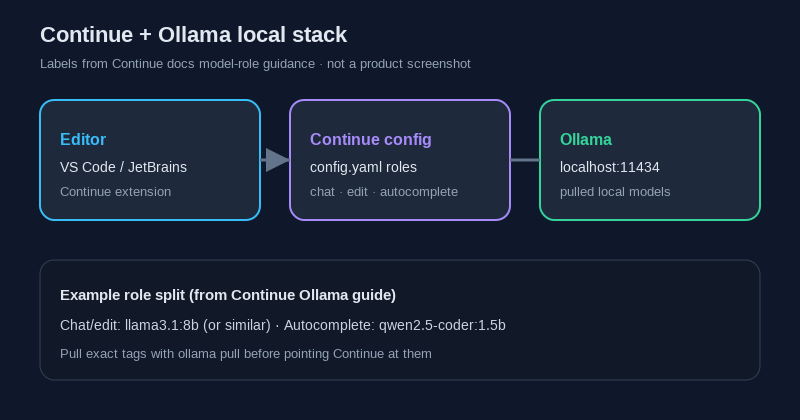
Continue's Ollama guide is the practical path for privacy-focused or offline work. Official prerequisites call for macOS, Linux or Windows, at least 8GB RAM (16GB+ recommended), about 10GB free disk, and the Continue extension installed. Ollama serves models at http://localhost:11434. Continue can talk to that endpoint through config.yaml model blocks, Autodetect, or a manual provider: ollama entry.
Step-by-step local setup
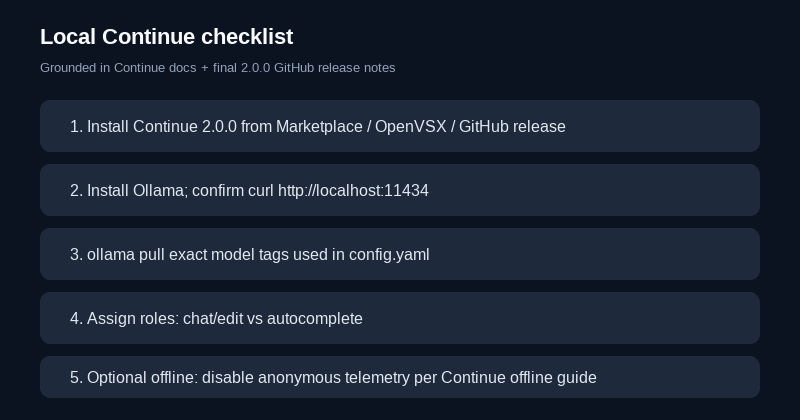
- Install Continue 2.0.0 from the VS Code Marketplace, OpenVSX, or the GitHub release assets listed in the README. JetBrains users should note the README now recommends the Continue CLI over the JetBrains plugin.
- Install and start Ollama for your OS (Homebrew, the official Linux install script, or the Windows installer from ollama.com). Verify with
curl http://localhost:11434— you should see that Ollama is running. - Pull exact model tags with
ollama pull, notollama run(the docs warn thatrunopens an interactive session you do not need for Continue). Example tags from the Continue Ollama guide includeqwen2.5-coder:1.5bfor autocomplete and larger chat models such asllama3.1:8b. Matching the tag inollama listto your config avoids the common404 model not founderror. - Configure roles in
config.yaml. A common pattern from the docs: one model with roleschat,edit,apply, and a smaller coder model with roleautocomplete. Model blocks likeuses: ollama/...only configure Continue — you must still pull the underlying tag locally. - Restart the editor after config changes. For air-gapped use, Continue's offline guide says to install from a downloaded
.vsix, turn off anonymous telemetry, point the default model at a local provider, then restart.
Habits that keep local coding useful
- Right-size the model. Continue's guide maps roughly 1.5B–3B ≈ 4GB RAM, 7B ≈ 8GB, 13B ≈ 16GB, 32B ≈ 32GB. On memory errors, lower
contextLengthor pick a smaller tag. - Separate autocomplete from chat. Small fast coder models for tab complete; larger models for chat/edit.
- Know Agent-mode limits. Some Ollama models need
capabilities: [tool_use]. If Agent mode stays unsupported, switch to a model the docs list with confirmed tool support. - Keep git clean. Commit before large edits so you can revert.
Who this is for
Use this path for Continue's UX with offline/private inference, or as an Apache-2.0 reference after the Cursor acquisition. For a commercial IDE agent with active cloud velocity, evaluate Cursor or our coding agents list — and read Continue's acquisition page so expectations match.
Sources
- Continue acquisition page (continue.dev)
- continuedev/continue README — final 2.0.0 / read-only note
- Continue docs: What is Continue?
- Continue docs: Using Ollama with Continue
- Continue docs: Running Continue without internet
- Continue docs: Autocomplete with Ollama
- VS Marketplace: Continue
Related reading: Best Tools to Run LLMs Locally: Ollama, LM Studio, Best AI Code Editor 2026: Cursor, Windsurf, Copilot, Cline IDE Agent Guide: Install, Approve, Fix Bugs Safely and 9 Best Claude Code Alternatives (Free & Open Source).
FAQ
Is Continue still open source after joining Cursor?
Yes. Continue.dev states it joined Cursor and that the open-source codebase remains available. The GitHub README marks the repository read-only and points people at the final 2.0.0 release.
Do I need a cloud API key for this guide?
No. The Ollama path in Continue's docs runs models locally once you have pulled them. You can still add cloud providers later if you want.
Why does Continue say the model was not found?
Usually the config references a tag you have not pulled, or you pulled :latest while the block expects a specific size tag such as :32b. Run ollama list and align the strings.
Can I use Continue fully offline?
Continue documents an offline path: install a .vsix from GitHub Releases, disable anonymous telemetry, set a local default model, and restart the editor. Follow the current offline guide for details.