Open WebUI 0.13: Tabbed Workspace, Desktop and Browser Tabs, and a Safe Upgrade Checklist
Also available in Hindi: यह लेख हिंदी में पढ़ें
Open WebUI v0.13.0 was released on 3 November 2026 (GitHub shows 12:23 UTC), and its team published a longer walkthrough on 4 November titled "your model gets a computer." The Tabs button at the top of a chat now opens a workspace with files, terminals, a Git panel and, on a connected Open Terminal, Desktop and Browser tabs where a model and you share the screen. The release also changes the database and includes security fixes. If you run Open WebUI, read this checklist first. It draws on the GitHub notes, the official blog and OnPrem World, read on 5 November 2026.
What is new
- Tabbed workspace. Files, terminal sessions, artifacts, previews, voice calls and comments sit beside the chat, or fill the window.
- Desktop and Browser tabs. They need a connected Open Terminal with desktop or browser support. The blog says to use the default Docker image (about 4 GB) because the
slimandalpineimages lack the desktop, and to run Open Terminal v0.16.0 or later for the Browser tab. - Git panel. When the terminal folder is a Git repository, you can review diffs, stage, commit, manage branches and work with GitHub pull requests.
- Sub-agents on other models. A model can now hand work to models you choose in the model editor, not only copies of itself.
- Team and tool features. Comment threads, a notification inbox, MCP apps inside the chat, knowledge-base file limits, private Python tools written by models, and an on/off switch for every tool.

How the "computer" part works
An administrator connects Open Terminal once, under Settings > Admin > Integrations, and chooses who gets access. Until then only administrators can use it. Each person then picks the terminal in the message box and opens the Desktop tab from the + menu. The model needs tool calling and image input. The blog says screenshots go to the model you pick, so a cloud model sends them to its provider.
Safety settings that matter
The blog is direct about risk. A web page can carry instructions aimed at the model, so for sites you do not control it recommends running Open Terminal in Docker, keeping Ask for approval on and staying signed out of accounts you care about. Approval mode makes every tool call, including desktop and browser tools, wait for you. An administrator has to turn on Tool Permissions first, and the default is Full access, where calls run immediately. Installed with pip on a desktop OS, Open Terminal works on your own logged-in screen, so use Docker for a team.
Before you upgrade
The GitHub notes and the blog agree on these points.
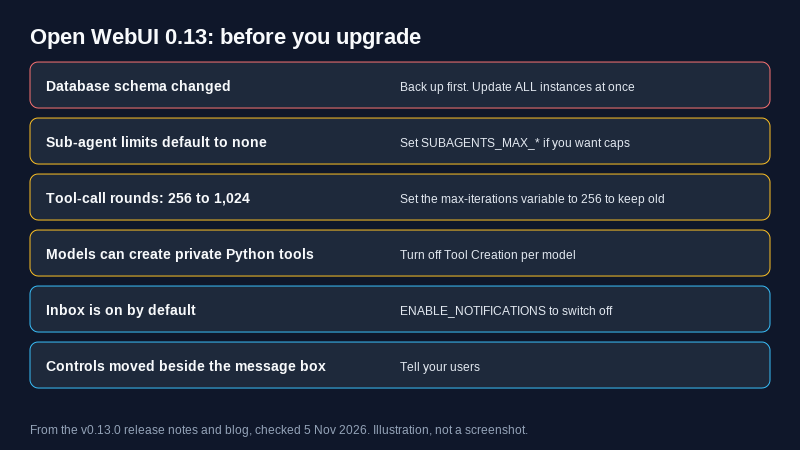
- Back up first. The release changes the database schema. The notes describe no downgrade path.
- Update every instance at once. With several workers, servers or a load balancer, rolling updates are not supported and cause failures.
- Expect security fixes. The release says it contains fixes not listed in the changelog, and advisories will follow after CVE assignment. The project strongly recommends updating all deployments.
- Set sub-agent limits. They now default to no limit, where they were 20 at once, 20 in the background, 30 tool loops each and 30,000 characters of output. Sub-agents start off.
- Decide on tool-call rounds. One response can now run up to 1,024 rounds, up from 256. Setting
CHAT_RESPONSE_MAX_TOOL_CALL_ITERATIONSto 256 keeps the old cap. - Review private tool creation. Turn off Tool Creation in a model's builtin tools if you do not want models writing tools.
- Warn users. Chat controls moved beside the message box, and the Inbox is on by default (
ENABLE_NOTIFICATIONSturns it off).
The separate Open WebUI Desktop 0.1.x app no longer switches between remote servers or bundles Open Terminal.
Our take
This is a large release, and its plainest feature, a Git panel and files beside the chat, may be the most useful. The Desktop and Browser tabs widen what a model can touch, so start with a test terminal in Docker and a small group. I have not tested 0.13, and the blog's demos are vendor-made. For background, see our guide to tools for running LLMs locally and AI agent hosting options.
Sources
- GitHub: Open WebUI v0.13.0 release notes (3 Nov 2026)
- Open WebUI blog: v0.13.0, your model gets a computer (4 Nov 2026)
- OnPrem World: Open WebUI 0.13 adds a tabbed workspace (3 Nov 2026)
FAQ
What do I need for the Desktop and Browser tabs?
A separately configured Open Terminal connection with desktop or browser support. The blog recommends the default Docker image and Open Terminal v0.16.0 or later for the Browser tab.
Can I roll back after upgrading?
The notes describe no downgrade path, so restoring your database backup is the safe route. The release changes the schema.
Do I need to update all my servers together?
Yes, if you run multiple workers, servers or a load balancer. The release notes say rolling updates are not supported.
Are sub-agents limited by default now?
No. The old defaults of 20 concurrent, 20 background, 30 loops and 30,000 characters are gone, and the new default is no limit. Set the SUBAGENTS_MAX_* variables if you want caps.