
Kiro CLI 3.0 Migration Guide: V3 Is Now the Default, What Changes and How to Roll Back
Also available in Hindi: यह लेख हिंदी में पढ़ें
Kiro CLI 3.0.0, dated 3 November 2026, makes the V3 agent harness the default for new interactive sessions, retires the Classic interface and the desktop app, and removes five commands. If you only chat with Kiro in a terminal, you will mostly see a prompt. If you have scripts, CI jobs, custom agents or hooks, ten minutes of checking now is cheaper than a surprise later.
What changed in 3.0
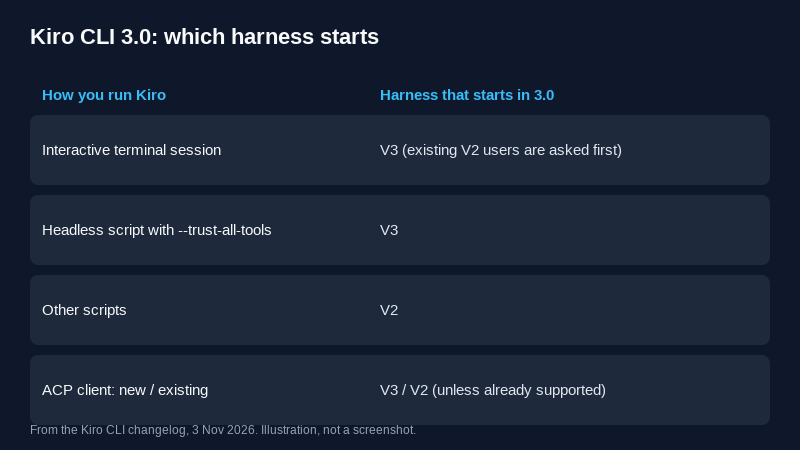
According to Kiro's changelog, V3 is now the default harness for interactive sessions on hosts that can run it, and users who already run V2 are asked first. The defaults differ by how you run Kiro:
- Interactive terminal: new sessions start on V3.
- Headless scripts: scripts that pass
--trust-all-toolsstart on V3; other scripts stay on V2. - ACP clients: new clients start on V3; existing ones stay on V2 unless already supported.
Kiro CLI is also now a single standalone kiro-cli binary. The Classic (V1) interface no longer runs, the desktop app is gone (macOS installs switch to the standalone binary on the next update check), and the autocomplete, inline, translate, theme and dashboard commands are unavailable. kiro-cli doctor now points you to kiro-cli diagnostic or kiro-cli issue.
A ten-minute pre-flight checklist
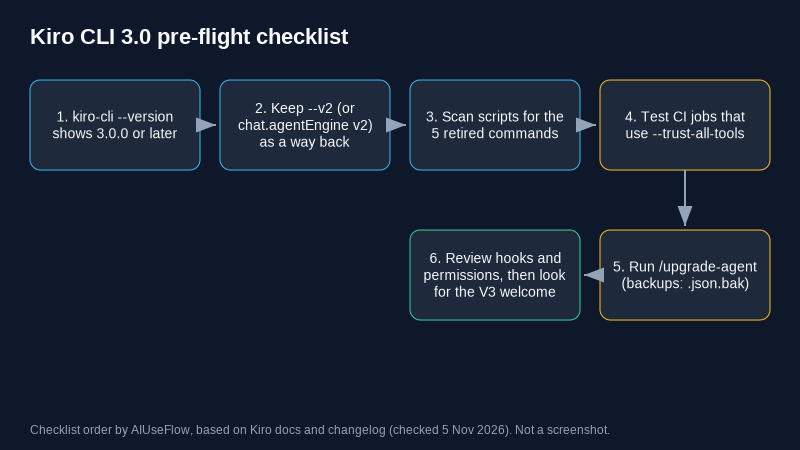
- Check the version. Kiro's upgrade page says to confirm
kiro-cli --versionreports 3.0.0 or later. - Keep the way back open.
kiro-cli --v2runs V2 for one session. Saving it permanently iskiro-cli settings chat.agentEngine v2. - Search your dotfiles and scripts for the five retired commands. Inline shell autocomplete ended with the desktop app, and AcceptAll HQ's summary notes there is no replacement.
- Test every CI job that uses
--trust-all-tools. AcceptAll HQ points out that these scripts flip to V3 without being asked first. Run each once by hand, or pass--v2until you have. - Decide about your agents. Per Kiro's changelog, V2-format agents are upgraded automatically (this has been on by default since 30 October); each file is rewritten in place after a
.json.bakbackup is saved. To keep V2 agents untouched, runkiro-cli settings chat.enableAutoAgentUpgrade false, or run/upgrade-agentyourself inside V3. - Read the breaking-changes table before you trust the upgrade (next section).
- Verify. After starting V3, look for the "Welcome to Kiro CLI V3" screen, and keep V2 available while you test.
Breaking changes that bite
Kiro's V3 documentation lists several changes that an automatic upgrade cannot fully hide:
- The built-in
use_awstool is unavailable; use MCP servers for AWS access instead. - Hooks moved from a camelCase object to PascalCase arrays or standalone
.kiro/hooks/*.jsonfiles, and trigger names changed (agentSpawnbecameSessionStart). - Trust moved from per-tool
toolsSettingsto a capability-basedpermissions.yaml. - Sub-agent tool calls are checked against the parent policy, and headless runs deny them.
- The session format changed. Resuming a V2 session in V3 creates a V3 copy and keeps the original, but V2 cannot open V3 sessions.
- The experimental
/checkpointis not on V3; use version control plus/rewind.
New in V3 worth trying
Kiro lists resumable cloud sessions, an opt-in Memory feature, /sandbox, /autonomous on (sandbox on, no per-command approval) and Workflows that show their plan first. "Approve for me" is opt-in too, and your deny, ask and allow rules still decide first. Treat autonomous mode as something to try on a throwaway repository first, not on a CI runner that holds secrets.
What we could not confirm
We did not install 3.0 or run these commands ourselves, so everything here comes from Kiro's published notes. Kiro's changelog and docs do not say how many agents or hooks need manual work in a typical project, so count your own. For a wider view of terminal agents, see the best AI coding agents in 2026, Claude Code alternatives and our guide to prompting coding agents. The tool profile is on our Kiro page.
Sources
- V3 by Default, Classic and Desktop App Retired, Kiro CLI changelog, 3 Nov 2026
- Kiro CLI V3 documentation (upgrade steps and breaking changes), Kiro
- Kiro CLI 3.0 defaults to V3, retires Classic and the desktop app, AcceptAll HQ, 3 Nov 2026
FAQ
Do I have to move to Kiro CLI V3 right now?
Not for interactive use: users who already run V2 are asked first. You can run kiro-cli --v2 for one session or save chat.agentEngine v2 as a setting.
Which scripts switch to V3 by default?
Headless scripts that use --trust-all-tools start on V3. Other scripts stay on V2, and new ACP clients start on V3.
Will my custom V2 agents break?
V2-format agents are upgraded automatically unless chat.enableAutoAgentUpgrade is false, with a .json.bak backup saved first. Hooks and permissions use new formats, so test them after the upgrade.
Can V2 open sessions created in V3?
No. V3 keeps a separate session store. It can resume a V2 session by creating a V3 copy and keeping the original.