
How to Dub a YouTube Video into Hindi with ElevenLabs: A Step-by-Step Guide
Also available in Hindi: यह लेख हिंदी में पढ़ें
If you publish in English and want Hindi-speaking viewers too, ElevenLabs Dubbing can translate your video's speech and re-voice it in Hindi while trying to keep each speaker's own voice. This guide takes one English YouTube video, makes a Hindi audio track, and attaches it to the same video in YouTube Studio. Steps checked against official help pages on 5 November 2026.
What ElevenLabs Dubbing does (and does not do)
ElevenLabs says Dubbing translates audio and video into 90+ languages while keeping each speaker's emotion, timing and tone and the background audio. Hindi (hi) is on its Dubbing v2 language list, as are Bengali, Marathi, Tamil, Telugu, Gujarati, Kannada, Malayalam, Punjabi and Urdu.
Three limits matter before you start:
- No lip sync. ElevenLabs' FAQ says Dubbing does not include lip syncing. Talking-head videos will show mouth movements that do not match the Hindi words.
- The video is a preview, not a master. The docs say dubbed video is usually output at 1080p and may not match your source resolution, and that Dubbing v2 audio is at most stereo. Their own advice: download the dubbed audio and use it to replace the audio track on your original video.
- Free plan dubs carry a watermark that cannot be removed. Paid plans do not add one.
Step 1: Create the dub
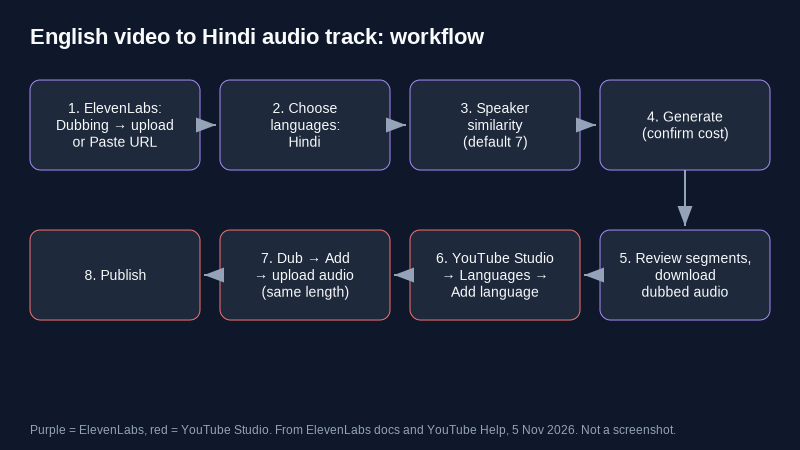
- Open Dubbing in the ElevenLabs app.
- Upload the video or audio file, or use the Paste URL tab to point at your YouTube video.
- In Choose languages, pick Hindi. You are charged for each language you select, so add Tamil or Bengali only if you will actually publish them.
- Click Speaker similarity (see Step 2).
- Click generate. ElevenLabs shows the cost and asks you to confirm before it starts.
Upload limits differ between ElevenLabs pages (2 GB in the product guide, 1 GB in the capabilities overview, both 180 minutes), so keep files under 1 GB to be safe.
Step 2: Pick a speaker similarity setting
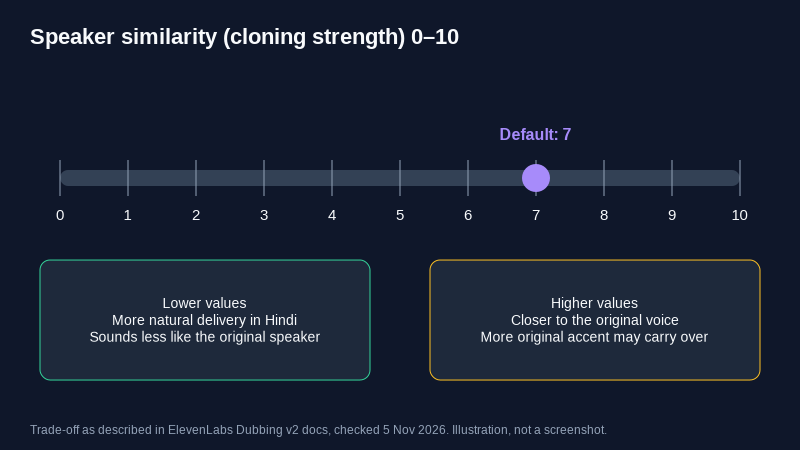
The Dubbing v2 model has a cloning strength setting from 0 to 10, labelled Speaker similarity in the app. ElevenLabs says the default of 7 suits most content. Higher values sound more like the original speaker but can sound less natural across languages with very different sounds, and can carry more of the original accent into the Hindi. Lower values give more natural Hindi delivery but sound less like you.
A sensible test: dub a two-minute clip at 7 and at a lower value, and ask a native Hindi speaker which sounds better.
Step 3: Review and fix the translation
Do not publish a machine dub unheard. Dubs made with the v2 model can be edited in the web app, so you can correct the transcript or translation of a segment and regenerate it. Check brand names, numbers and technical terms. (Doing the same through the API is Enterprise-only.)
Step 4: Add the Hindi track in YouTube Studio
Download the dubbed audio. YouTube's multi-language audio lets one video carry several audio tracks that viewers can switch between. On desktop:
- In YouTube Studio, open Languages from the left menu and pick the video.
- Click Add language, choose Hindi.
- Next to Dub, click Add, then Select file and upload the audio-only file. It should be roughly the same length as the video.
- Click Publish.
YouTube says this needs access to Advanced features. If YouTube already created an automatic dub in Hindi, you must delete it first. A track whose content differs from the original audio may be removed for copyright, so upload only a faithful dub.
Who this workflow suits
It fits tutorial and course videos that are mostly voice-over or screen recordings, where missing lip sync barely shows. It is weaker for close-up talking heads. For other voice tools, see our AI voice tools guide; to cut the same video into Shorts, read the Klap AI guide; and for more video options, see AI video generators for content creators.
Sources
- Dubbing product guide and FAQ, ElevenLabs docs
- Dubbing capabilities overview and supported languages, ElevenLabs docs
- Refine and regenerate a dub (API), ElevenLabs docs
- Add Multi-language features to your videos, YouTube Help
- YouTube multi-language audio: how to add it step by step, AIR Media-Tech
FAQ
Can ElevenLabs dub English videos into Hindi?
Yes. Hindi is on the Dubbing v2 supported language list, along with several other Indian languages such as Tamil, Telugu, Bengali and Marathi.
Is ElevenLabs Dubbing free?
Dubbing is available on all plans including free, but free-plan dubs are watermarked and the watermark cannot be removed. Cost is per minute of source media for each target language; the app shows the total before you confirm.
Does ElevenLabs Dubbing do lip sync?
No. ElevenLabs says Dubbing does not include lip syncing, so it works best for voice-over, screen recordings and tutorials.
Why can't I add a Hindi audio track on YouTube?
YouTube says multi-language audio needs access to Advanced features. If an automatic Hindi dub already exists, delete it before uploading your own.