
Runway Dev Plugin for Claude Code, Codex and Cursor: Install and First Tasks
Also available in Hindi: यह लेख हिंदी में पढ़ें
On 2 November 2026 Runway launched Runway Dev plugins for Claude Code, Codex and Cursor. One install connects your coding agent to your Runway Dev account and teaches it Runway's API, so you can ask for "a product video for every item in my store" and have the agent write the integration. One thing to understand first: the plugin does not make videos. Runway's docs say generations run in your own app through the API. The plugin only makes the coding agent better at building that app. Everything here comes from Runway's own docs and launch post, checked on 5 November 2026.
What is inside the plugin
The plugin bundles two parts. The first is the Runway Dev MCP, which links the agent to your account. Through it the agent can see which models your project can use, with their limits and prices, set up Model Routers, manage Characters, and look into failed tasks and routing decisions. The second is a set of skills that show the agent how to use the official SDKs and build with models, Model Routers, Characters, Recipes and Workflows. Runway's launch post says the agent reads your projects, model access, prices and credit balance, so the integration is sized to what you actually have.
| Skill | What it covers |
|---|---|
runway-dev-setup |
Connecting your account and project |
runway-dev |
Current docs, credentials, SDKs and errors |
runway-dev-models |
Video, image and audio model endpoints |
runway-dev-model-routers |
Model Routers |
runway-dev-characters |
Characters and real-time sessions |
runway-dev-recipes |
Recipes |
runway-dev-workflows |
Published Workflows |
Install it
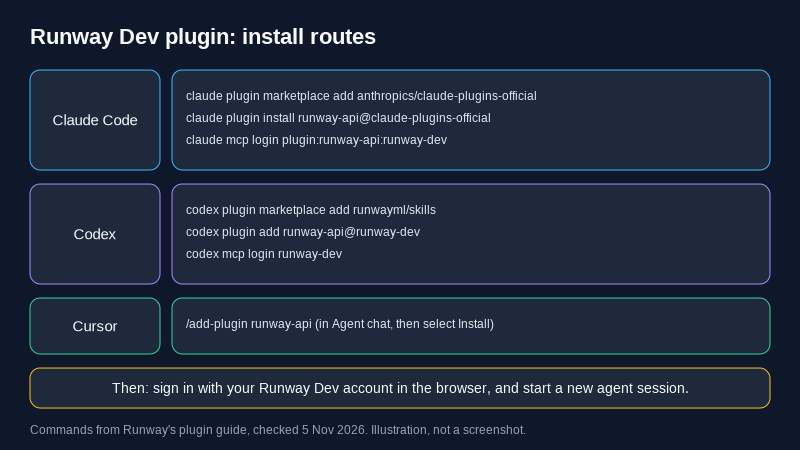
Run these in a terminal, then start a new session. The last command in Claude Code and Codex opens your browser so you can sign in yourself; Runway says not to ask the agent to automate that.
Claude Code
claude plugin marketplace add anthropics/claude-plugins-official
claude plugin install runway-api@claude-plugins-official
claude mcp login plugin:runway-api:runway-dev
On Claude Code older than 2.1.186, run /mcp inside a session and choose the Runway Dev server instead of the login command. You can also use /plugin install runway-api@claude-plugins-official.
Codex
codex plugin marketplace add runwayml/skills
codex plugin add runway-api@runway-dev
codex mcp login runway-dev
Runway also lists the plugin in the directory that ChatGPT and Codex share. Use one install route only, and note that the Codex IDE extension does not support plugins.
Cursor: type /add-plugin runway-api in Agent chat and select Install.
If your agent has no plugin support, Runway documents a manual route: connect the MCP server at https://dev.runwayml.com/mcp and install the skills with npx skills add runwayml/skills --skill runway-dev-setup --skill runway-dev (plus --skill runway-dev-models for model endpoints, and your agent's name with -a). Every integration needs the first two skills.
First tasks to try
Runway suggests three prompts after you install: "Help me integrate video generation into this app", "Help me investigate a failed Runway task", and "Configure a Model Router to favor lower-cost models". Start with the second one if you already have an integration. A failed task is a good test because the agent can read the error details and see why a Model Router chose a given model.
What it can and cannot do
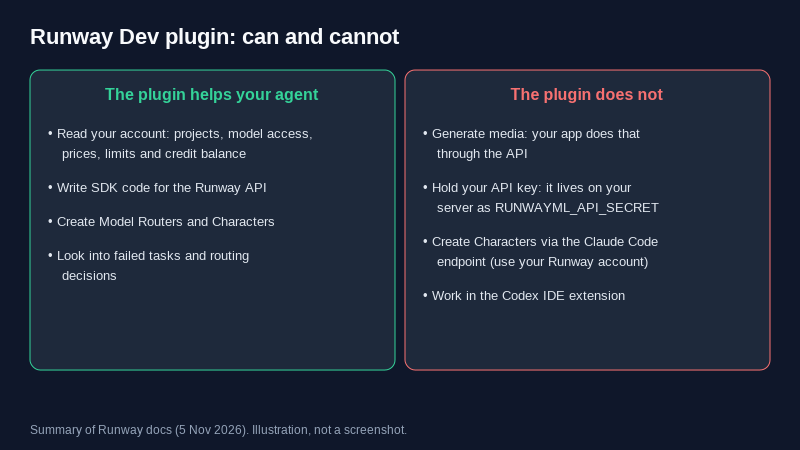
The agent can read your account, write SDK code, create Model Routers and Characters, and debug failed tasks. It does not generate media inside the editor, and it does not hold your API key. Your app uses its own key from your Runway Dev account, stored on your server as RUNWAYML_API_SECRET, and Runway says never to put it in the plugin or MCP config. One Claude Code limit: the plugin connects to a Claude-specific MCP endpoint that cannot create new Characters, so create those in your Runway Dev account.
Our take
This is a sensible way to avoid pasting API docs into prompts, particularly for teams who ship by directing an agent. Before you rely on it, check what your projects will cost: the agent can read prices and limits, but your usage is still billed. For price comparisons with other video APIs, see our AI video API pricing guide and the Luma pricing breakdown. If you are new to the protocol behind the account link, MCP explained covers it. All the claims here are Runway's own, so test the setup on a small project first.
Sources
- Runway Dev docs: Install the Runway Dev plugin
- Runway News: Runway Dev is in Claude Code, Codex and Cursor (2 Nov 2026)
FAQ
Does the Runway Dev plugin generate videos inside Claude Code or Codex?
No. Runway's docs say the plugin does not generate media. Generations run in your app through the Runway API.
Where do I put my Runway API key?
On your server as RUNWAYML_API_SECRET, created in your Runway Dev account. Runway says never to place the key in the plugin or MCP config.
Can I install it with both the plugin and npx skills?
Runway says to pick one route. Installing both gives the agent two copies of each skill.
Which agents are supported?
Claude Code, Codex and Cursor have plugins. Other agents that support MCP and Agent Skills can use the manual route.