Kling 4.0 Flash vs Kling 4.0: Which to Use and What a Clip Really Costs
Also available in Hindi: यह लेख हिंदी में पढ़ें
On 4 November 2026 Kling AI announced that Kling 4.0 Flash is open to all users on the Kling website and the API, with access through MCP, CLI and plugins for Adobe Photoshop, Premiere Pro and After Effects. That raises a practical question for anyone paying per second: when is the cheaper Flash model enough, and when do you need full Kling 4.0? This guide compares the two using Kling's own API documentation and pricing page, and shows the arithmetic. We have not generated clips with either model, so quality comparisons are left to your own tests.
What was announced
News reports from Jiemian, The Reel Stack and ArtRealmAI describe the 4 November announcement as Flash becoming available to everyone on the Kling AI website and API, plus MCP, CLI and AI-plugin access and the three Adobe plugins. Kling's API Updates page, the official record, lists Kling 4.0 Flash for 4 November 2026 and the full Kling 4.0 for 28 October 2026 (dates as shown on that page). We could not open Kling's original social post, so plugin availability by region or plan is not confirmed here.
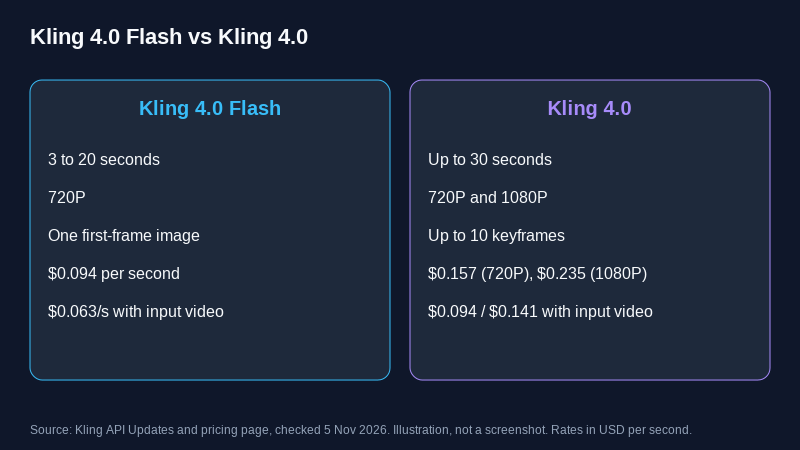
Flash vs full Kling 4.0: the documented limits
| Kling 4.0 Flash | Kling 4.0 | |
|---|---|---|
| Output length | 3 to 20 seconds | up to 30 seconds |
| Resolution | 720P | 720P and 1080P |
| Image-to-video input | a single first-frame image | up to 10 keyframes |
| Price, no input video | $0.094 per second | $0.157 (720P), $0.235 (1080P) per second |
| Price, with input video | $0.063 per second | $0.094 (720P), $0.141 (1080P) per second |
According to the API Updates page, Flash has three endpoints: text-to-video, image-to-video and Omni reference-to-video, with prompts up to 26,000 English characters, up to 10 reference images and up to 5 reference videos. Omni accepts up to 15 inputs. The full Kling 4.0 entry lists the same input limits and adds that its Omni endpoint can reference voices directly; the Flash entry does not mention that. The dollar figures come from Kling's pricing page for resource-package deductions; check your own plan for exact billing.
How billing works with reference videos
Kling bills Flash and Kling 4.0 by total duration. If an input video is shorter than or equal to the output, the unit price is multiplied by the output length times two. If the input is longer than the output, it is multiplied by input plus output length. The lower per-second rate with input video is therefore not a discount in practice. These examples are our own arithmetic from Kling's published rates:
| 10-second output | No input video | With a 10-second input video |
|---|---|---|
| Kling 4.0 Flash, 720P | $0.94 | $1.26 |
| Kling 4.0, 720P | $1.57 | $1.88 |
| Kling 4.0, 1080P | $2.35 | $2.82 |
A draft-then-finish workflow
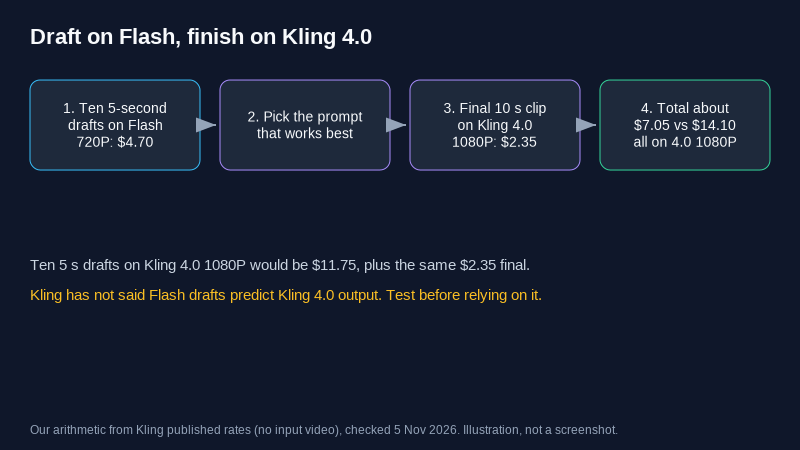
Because Flash is cheaper per second, one sensible use is trying ideas on it. Ten 5-second drafts at 720P cost $4.70 on Flash. The same ten on Kling 4.0 at 1080P would cost $11.75. After choosing a prompt, you would generate the final 10-second 1080P clip on Kling 4.0 for $2.35, so the full routine is about $7.05 rather than $14.10. One honest caveat: Kling has not said that a Flash draft predicts how Kling 4.0 will render the same prompt. Treat drafts as a way to test wording and framing, then check the final.
When to skip Flash
Choose full Kling 4.0 if you need clips longer than 20 seconds, 1080P output, or several keyframes to control where a shot ends. Flash is documented to take only a single first-frame image, so shots that must land on a specific frame may take more retries, and retries cost money. Kling's Flash entry says nothing about audio output, so if you need sound, check the documentation for your endpoint or plan it separately, for example with an audio tool like ElevenLabs.
For wider context, see our best AI video generators list, how AI video API pricing works and the content creators' video generator comparison.
Sources
- API Updates, Kling AI developer documentation (entries dated 10/28/2026 and 11/04/2026)
- Video pricing and resource package deduction rules, Kling AI developer documentation
- Kling 4.0 Flash is open to everyone, including API, MCP and Adobe plugins, The Reel Stack
- 可灵4.0 Flash全面开放使用, Jiemian News (4 Nov 2026)
- Kling 4.0 Flash Fully Available Everywhere, ArtRealmAI (4 Nov 2026)
FAQ
Is Kling 4.0 Flash free?
We did not find a free-use statement. Kling's pricing page lists per-second rates, and the announcement coverage says access is open to all users, so check your account's plan and credits.
What is the maximum length and resolution of Kling 4.0 Flash?
Kling's API Updates page lists 3 to 20 seconds at 720P. Full Kling 4.0 is listed up to 30 seconds at 720P and 1080P.
Which API endpoints does Flash use?
Text-to-video, image-to-video and Omni reference-to-video, with the model name kling-4.0-flash in each path.
Why does a reference video make a clip cost more?
Kling counts input and output duration together. When the input is no longer than the output, total duration is the output length times two.