
GitHub Copilot in JetBrains Air: Local vs Cloud Tasks and What to Watch
Also available in Hindi: यह लेख हिंदी में पढ़ें
On 3 November 2026 GitHub and JetBrains announced that GitHub Copilot can now be chosen as the agent in JetBrains Air. You can run Copilot tasks on your own machine inside a JetBrains IDE, or in the cloud through Air Teams, and both use your existing Copilot plan rather than JetBrains AI credits. That is useful if your company already pays for Copilot and you want Air's multi-agent workflow. This guide explains the two modes, how to set them up, and the points GitHub and JetBrains both flag as easy to miss. Checked against their announcements on 5 November 2026.
What changed
Air is JetBrains' app for delegating coding tasks to agents. It now runs the official GitHub Copilot CLI through the Agent Client Protocol (ACP), next to the other agents it already offers. Per GitHub's changelog, you can track several agent sessions at once, give them project context and IDE tools, and review changes beside your code. You can use Copilot in Air alongside the regular GitHub Copilot plugin.
Local tasks: the quick start
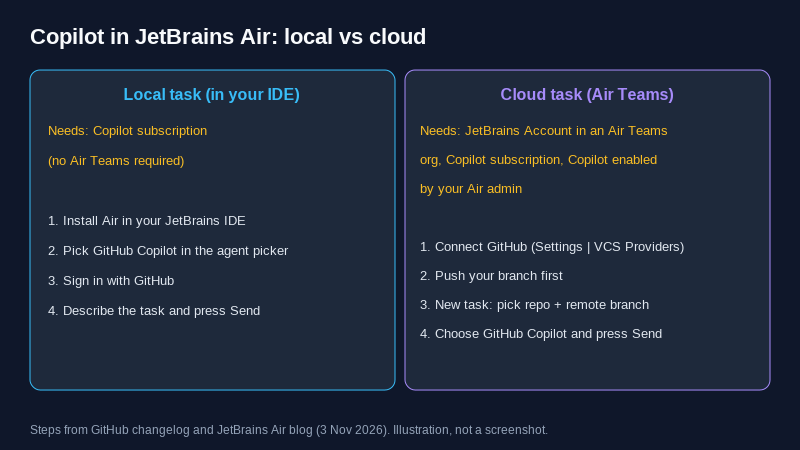
Local mode needs a Copilot subscription but not Air Teams. Install Air in your JetBrains IDE, choose GitHub Copilot in the agent picker, sign in with GitHub, describe the task and press Send. If you are weighing editors, our Copilot vs Cursor comparison and best AI code editors list give context.
Cloud tasks: what you need
Cloud mode needs a JetBrains Account inside an organisation that uses Air Teams (a business plan), a Copilot subscription, and Copilot enabled by your Air administrator. There are two ways in:
- Browser: open Air, go to Settings, VCS Providers, and connect GitHub. Create a task, pick the repository and remote branch, choose GitHub Copilot and send the prompt.
- IDE: in the Air plugin, choose Cloud in the environment selector, pick the repository and branch, authorize the GitHub app if asked, then choose Copilot.
Push your work first. JetBrains says cloud agents work from a remote branch, so unpushed local changes are not visible to them.
How a cloud task runs and ends
Each cloud task gets a fresh virtual machine. Copilot works in a Docker container signed in with your GitHub account, traffic goes through a proxy, and nothing carries over to the next task. Air's docs add three lifecycle details:
- After every agent turn, the output is committed and pushed to a separate task branch. Nothing is staged for you to review first.
- Your own hand edits stay uncommitted, so commit them before your next prompt or they end up in the agent's commit.
- The environment suspends after 75 minutes of inactivity (you can resume it), and the task is archived after 24 hours of inactivity. Archived tasks cannot be resumed, but the results stay on the branch.
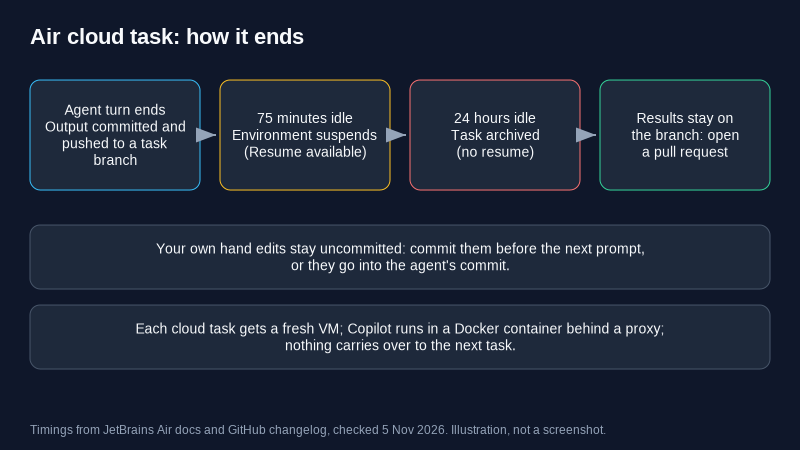
You can open a pull request from the task branch. Air's docs say the browser has no built-in review pass, while the Air app does.
Caveats before you roll it out
- Credits. Air cannot see or limit Copilot usage, and Air administrators can disable Copilot but cannot set spending limits. Check usage on GitHub. JetBrains says Air does not warn when credits run out, so a task that fails soon after it starts may mean no credits are left.
- Plan choice. You cannot choose, per task, between a personal and an organisation Copilot plan.
- Automations. Air can run tasks on a schedule or on events such as a new pull request, using your Copilot plan. JetBrains suggests a weekly dependency update as a first automation, and warns that a review automation on a busy repository can use credits fast.
- Permissions. Connecting Copilot to Air does not request Copilot permissions; Air may only check your subscription or credits when a cloud environment starts.
Our take
If you already live in IntelliJ IDEA, PyCharm or WebStorm and pay for Copilot, the local mode costs nothing extra to try. Treat cloud tasks more carefully: automatic pushes to a task branch are convenient, but the lack of usage limits means a mistake in an automation could burn through your plan. Try one small manual cloud task, check GitHub's usage page, and only then schedule anything. Both announcements come from the companies selling the integration, so compare results with your normal workflow.
Sources
- GitHub Changelog: GitHub Copilot is now available in JetBrains Air (3 Nov 2026)
- JetBrains Air blog: GitHub Copilot in Air
- JetBrains Air docs: Run tasks in the cloud
FAQ
Do Copilot tasks in Air use JetBrains AI credits?
No. GitHub's changelog says tasks use your existing GitHub Copilot plan, not JetBrains AI credits.
Do I need Air Teams to use Copilot in Air?
Only for cloud tasks. Local tasks need a Copilot subscription, but not Air Teams.
What happens if my Copilot credits run out?
The task fails with an error in the session. JetBrains says Air does not warn you beforehand, so watch your usage on GitHub.
Can I resume an archived cloud task?
No. Archived tasks cannot be resumed, but their results remain on the task branch and you can open a pull request from it.