
Figma Code Layers After 4 November: Build Prototypes with the Agent and Budget Your AI Credits
Also available in Hindi: यह लेख हिंदी में पढ़ें
Code layers in Figma went into open beta on 15 October 2026, and Figma's launch offer, free code layer edits on paid plans, ended on 4 November. That makes this the right moment to learn how to use them deliberately rather than by trial and error. This guide covers what a code layer is, four ways to start one, an iteration loop that keeps credit use sensible, and the limits to know about. Details come from Figma's help center and launch blog, checked on 5 November 2026.
What a code layer is
A code layer holds real, running code on the Figma canvas, so a design becomes an interactive prototype next to the frames it came from. Teammates can try it, comment on it, or duplicate it to test their own idea. Figma's help center says it is available on Education (not K-12), Starter, Professional, Organization and Enterprise plans, and you need edit access. Once enabled you will see a Code icon in the Figma Design toolbar; if it is missing, refresh the tab or restart the desktop app.
Four ways to start
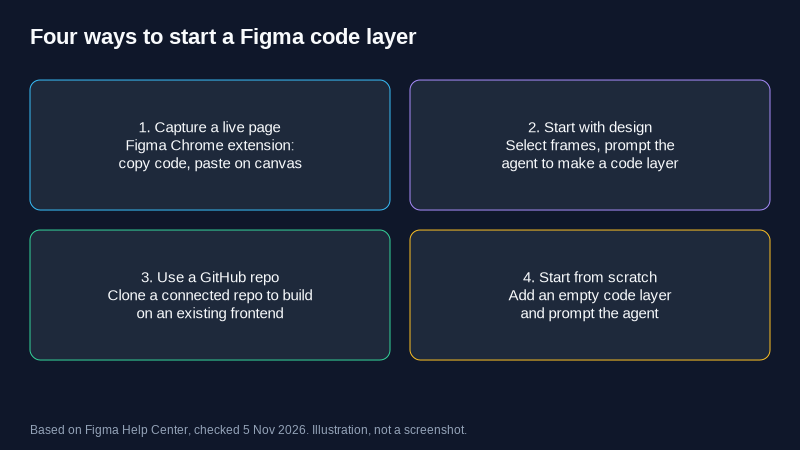
Figma lists these starting points:
- Capture a live page with the Figma Chrome extension and paste it as a code layer.
- Start from design: select frames and prompt the agent to turn them into a code layer.
- Use a GitHub repo: clone a connected repo to build on an existing frontend. Figma's blog says imports are for supported, lightweight prototyping codebases, and a GitHub import stays connected to the repo.
- Start from scratch: add an empty code layer and prompt the agent.
An iteration loop that wastes fewer credits
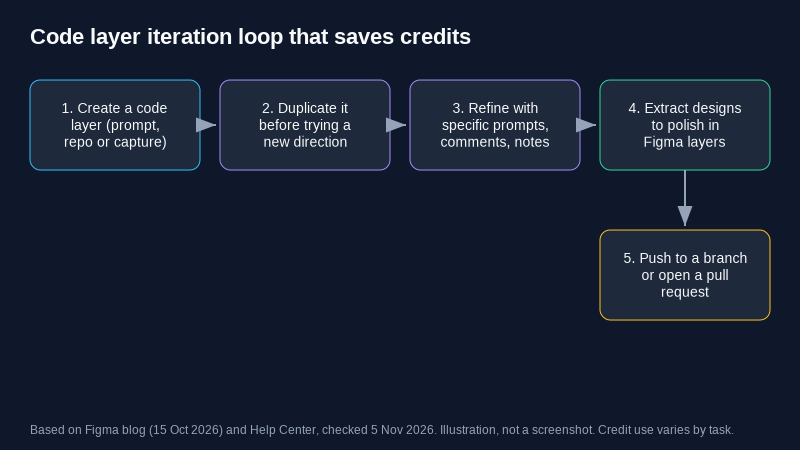
- Generate once, then duplicate. Figma's blog says multiple versions can sit side by side, so duplicate the layer before trying a different direction instead of overwriting your best version.
- Refine with precise prompts. Figma describes a case where a bug (cards stacking in the wrong order) was fixed after one specific description of the cause. You can also comment on the prototype, annotate frames to show where a change is needed, or edit the code directly.
- Merge the best parts. If the team likes one version's layout and another's interactions, ask the agent to combine them.
- Extract designs. For visual polish, use Extract designs to turn screens into editable Figma layers, adjust them, then send the edits back.
- Share. Push updated code to a branch, or open a pull request so teammates can review before merging.
Credits after 4 November
Code layers use Figma AI credits, and the amount varies with task complexity. Until 4 November, paid plans could generate and edit in code layers without using credits, though the agent's other work in the same prompt still cost credits. Figma says that after 4 November all code layer tasks use credits like other agent features. The sources we checked do not give a per-task rate, so watch the credit receipt after each prompt (Figma says the agent shows credits used per prompt, in its Specs FAQ). Adding a backend with Payload also uses more credits than building without it, per Figma.
Limits to know
- Only Enterprise plans can opt out, and doing so means turning off all Figma AI features.
- Figma's customer numbers are vendor-reported: for example, agency Merkle reports 30% faster iteration and 50% less documentation. Treat them as marketing, not a benchmark.
- Related betas also affect credit use: using the agent with Figma Specs (open beta) consumes credits, and a prompt that uses a library with Guidelines (open beta, Professional and above) may use more credits because the agent reads extra context. Figma's MCP server can also now generate interactive code layers from your AI tool.
If you are comparing design tools, read best AI UI design tools. For how design context reaches coding tools, see MCP explained, and for another prompt-driven editor, Canva Brush.
Sources
- What's new from Config India 2026, Figma Help Center
- Design together with code layers on the canvas, Figma blog, 15 Oct 2026
- Figma waives code layers AI credits on paid plans until November 4, Rise Productive
Related reading: Best AI App Builders 2026: Lovable vs Bolt vs Replit vs v0, Framer Convert Agent: A/B Tests and Country Triggers Guide and Git for Vibe Coders: A Beginner Safety Net.
FAQ
Are Figma code layers still free after 4 November 2026?
No. Figma's help center says creating and editing in code layers was free on paid plans through 4 November 2026, and after that all code layer tasks use AI credits.
Which Figma plans include code layers?
Figma lists Education (not K-12), Starter, Professional, Organization and Enterprise plans, and you need edit access.
Can I import an existing GitHub project into a code layer?
Yes, for a supported, lightweight prototyping codebase. Figma says a GitHub import stays connected to the repo, and you can push updates to a branch or open a pull request.
Can I turn code layers off?
Only Enterprise plans can opt out. Admins do it by turning off AI features, which also disables Figma's other AI features.